Decisions vs. Nintex
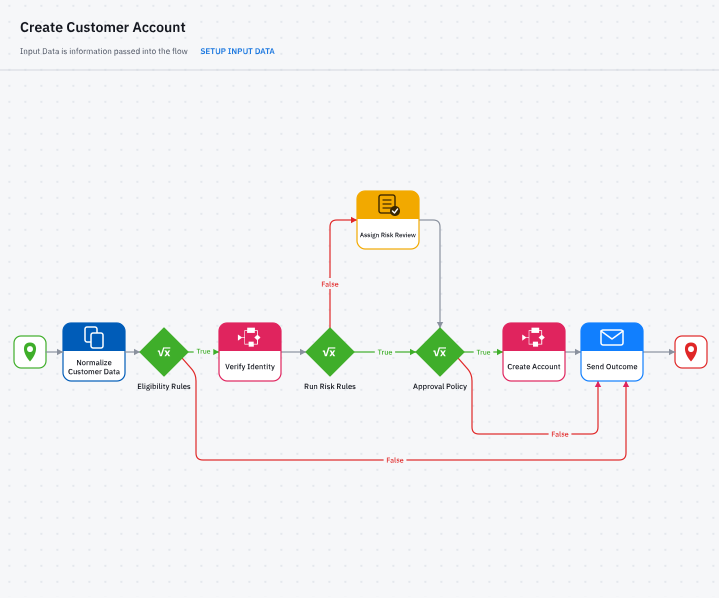
Decisions and Nintex are both low-code platforms for automating business processes. Decisions puts decision logic in its own rules engine that business experts control, and adds Deployment Tower for governed releases and bi-directional MCP. Nintex bundles workflows, forms, RPA, document generation and e-signature together in one platform.
Decisions vs.
Nintex at a glance
If you're evaluating Nintex alternatives or competitors, here's how it compares to Decisions.
✅ Strong | 🟠 Partial or different approach
Rules live in their own engine, separate from the workflow, in seven rule types, including decision tables, rule sets and rule chains. Business experts create and update them visually, without having to rework the entire workflows.
Decision logic and policy logic are built and maintained as part of the workflow.
- Decisions
- ✅
Rules live in their own engine, separate from the workflow, in seven rule types, including decision tables, rule sets and rule chains. Business experts create and update them visually, without having to rework the entire workflows. - Nintex
- 🟠
Decision logic and policy logic are built and maintained as part of the workflow.
Rules, workflows and forms are built by drag and drop, with no coding required.
Workflows and forms are built with clicks, not code, in a drag-and-drop designer.
- Decisions
- ✅
Rules, workflows and forms are built by drag and drop, with no coding required. - Nintex
- ✅
Workflows and forms are built with clicks, not code, in a drag-and-drop designer.
Deployment Tower promotes packaged changes through your environments with automated quality gates, approvals, and an audit trail.
Separate environments keep building and testing apart from production, and deployment follows your own release process.
- Decisions
- ✅
Deployment Tower promotes packaged changes through your environments with automated quality gates, approvals, and an audit trail. - Nintex
- 🟠
Separate environments keep building and testing apart from production, and deployment follows your own release process.
Rules keep their version history and named checkpoints, and any change can be rolled back.
Version History keeps the latest 100 workflow versions, and an earlier version can be reopened and republished.
- Decisions
- ✅
Rules keep their version history and named checkpoints, and any change can be rolled back. - Nintex
- 🟠
Version History keeps the latest 100 workflow versions, and an earlier version can be reopened and republished.
Bi-directional MCP. Decisions' MCP server lets clients like Claude and ChatGPT call chosen flows, and your own agents can use third-party MCP servers.
One-directional MCP, no capability for calling external MCP tools.
- Decisions
- ✅
Bi-directional MCP. Decisions' MCP server lets clients like Claude and ChatGPT call chosen flows, and your own agents can use third-party MCP servers. - Nintex
- 🟠
One-directional MCP, no capability for calling external MCP tools.
AI drafts rules from policy documents and forms from a prompt, and you adjust and test them before release.
AI Workflow Generator, AI Forms Assistant and AI Xtensions Generator build workflows, forms and connectors from prompts.
- Decisions
- ✅
AI drafts rules from policy documents and forms from a prompt, and you adjust and test them before release. - Nintex
- ✅
AI Workflow Generator, AI Forms Assistant and AI Xtensions Generator build workflows, forms and connectors from prompts.
Agents run inside your flows and hand final decisions to your rules, and every AI step is logged.
Agent Designer builds supervisor and multi-agent patterns inside orchestrated workflows.
- Decisions
- ✅
Agents run inside your flows and hand final decisions to your rules, and every AI step is logged. - Nintex
- ✅
Agent Designer builds supervisor and multi-agent patterns inside orchestrated workflows.
Deploys to the cloud, to a hybrid environment, or on your own premises.
Nintex Automation Cloud is SaaS, and Nintex K2 runs on-premises, in a private cloud or in a managed environment.
- Decisions
- ✅
Deploys to the cloud, to a hybrid environment, or on your own premises. - Nintex
- ✅
Nintex Automation Cloud is SaaS, and Nintex K2 runs on-premises, in a private cloud or in a managed environment.
Built-in process and task mining identify bottlenecks and compliance gaps, turning them directly into Rule Tables.
Task mining records user actions and turns them into process maps and automation candidates.
- Decisions
- ✅
Built-in process and task mining identify bottlenecks and compliance gaps, turning them directly into Rule Tables. - Nintex
- 🟠
Task mining records user actions and turns them into process maps and automation candidates.
Decisions automates through flows, APIs, and integrations rather than by operating desktop screens.
Nintex RPA bots automate tasks in desktop and browser applications, and can be reused or scheduled.
- Decisions
- 🟠
Decisions automates through flows, APIs, and integrations rather than by operating desktop screens. - Nintex
- ✅
Nintex RPA bots automate tasks in desktop and browser applications, and can be reused or scheduled.
What makes Decisions different from Nintex

A rules engine your business experts control
Decisions gives your business rules an engine of their own, outside the workflow, so experts can adjust thresholds, calculations, and routing logic without rebuilding the process..
✓ Seven rule types, including decision tables, rule sets and rule chains, are authored visually, and redesigned rule and truth table editors make complex logic easier to read and manage
✓ Rules are versioned, testable, and traceable, with an audit history of every execution.

MCP in both directions
Decisions exposes chosen AI tool flows through its MCP server, so clients such as Claude and ChatGPT can call them. Your own agents and Chat Completion steps can reach out to tools on external MCP servers too.
✓ Each tool call runs a flow, which keeps agent actions within your rules
✓ External servers connect over HTTP or STDIO, and you choose which tools to load
Top 5 in all four use cases
Gartner® Critical Capabilities for Decision Intelligence Platforms, 2026
Named a Challenger for DIP
Gartner® Magic Quadrant™ for Decision Intelligence Platforms, 2026

See how your process would run on Decisions
Get a walkthrough built around the rules and workflows you run today.
Govern every release with Deployment Tower
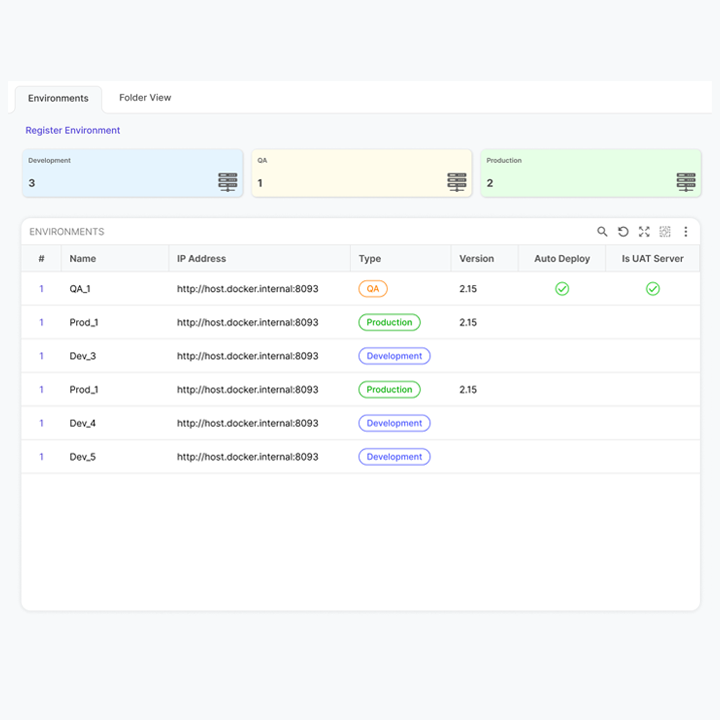
Deployment Tower brings planning, validation, and promotion into one governed release path. Stories and sprints sync from Jira or other PMIS, so every deployment traces back to the task behind it.
- Approvals, access control, and audit trails are built into each promotion
- See what is deployed in every environment, whether you run one organization or many
Process intelligence that turns insight into rules
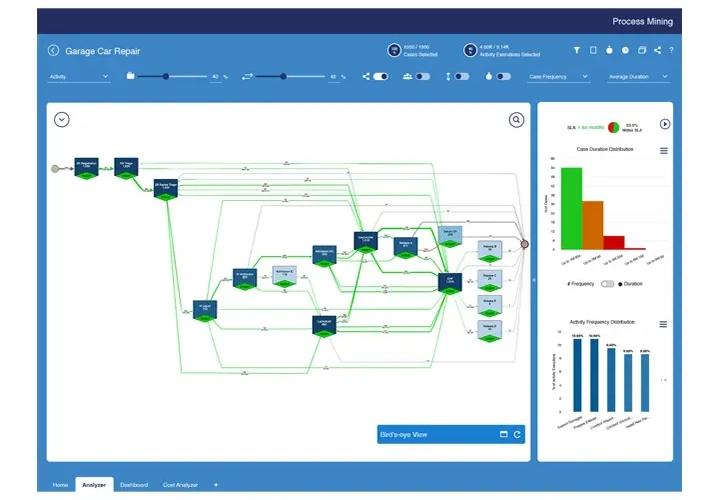
Built-in process and task mining maps how your work really flows, and its predictive models convert directly into Rule Tables.
- One-click Insight Analysis, plus a Variant Explorer, Compliance Checker, and Root Cause Diagnosis
- Rule Tables built from these models go through the same testing and deployment as every other rule
Policy documents become draft rules
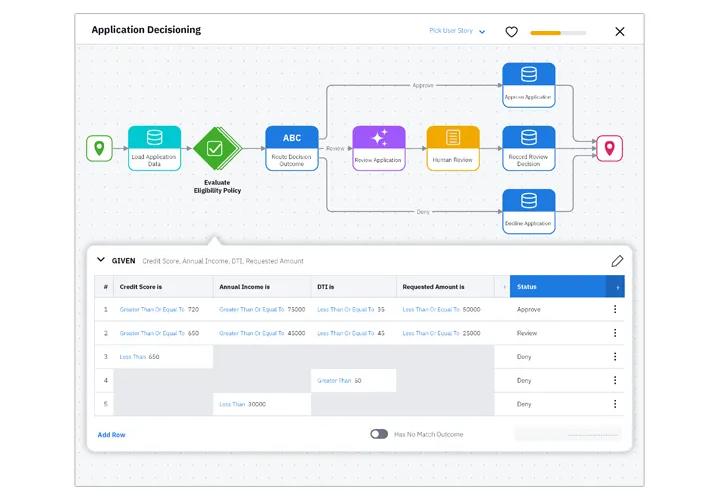
AI turns your policy documents into draft rules, so your team starts from working logic instead of a blank screen.
- Review and adjust the draft through chat, then test it before release
- AI agents call these rules for the final decision, so automated actions follow the policy your experts approved
“Decisions offers much more functionality than rules: flows, forms, integrations. This makes it possible to completely encompass business logic within, and implement complete working code modules without coding.”
Mid-Market company

Which platform is right for you?
Decisions and Nintex are both low-code platforms that teams use to automate everyday business processes. They differ in where decision logic lives: in a rules engine of its own that experts control, or inside the workflow.
Decisions is built for teams that:
- Want business experts to maintain rules themselves, without reworking a workflow each time
- Need rule changes to move through governed releases, with approvals and an audit trail
- Want to connect AI agents and clients such as Claude or ChatGPT to governed rules through MCP
- Need a comprehensive process mining and task mining tool
Frequently Asked Questions
Is Decisions a good Nintex alternative?
Yes, especially for teams that need business rules their experts can own. Decisions puts decision logic in its own rules engine and releases changes through Deployment Tower. Nintex may suit teams that want RPA, robust document generation, and e-signature capabilities in one suite.
Does Nintex have a rules engine?
Nintex Automation Cloud builds decision logic inside the workflow. Decisions keeps rules in a separate engine, so people closest to the rules (including business people) can change it without waiting on IT and editing the entire workflow.
How does a rule change get approved and released?

See your rules in Decisions
Bring a process you're evaluating and we'll show you how it runs on Decisions.